






한자변환(漢字變換)

 |
Latest Version | v1.2.9 |
 |
Update | Feb,12/2026 |
 |
Developer | 박희섭 Park Heesob |
 |
OS | Android 5.1 or later |
 |
Category | Tools |
 |
Size | 3.23M |
| Tags: | Tools |
-
Latest Version
v1.2.9
-
Update
Feb,12/2026
-
Developer
박희섭 Park Heesob
-
OS
Android 5.1 or later
-
Category
Tools
-
Size
3.23M



 Download(v1.2.9)
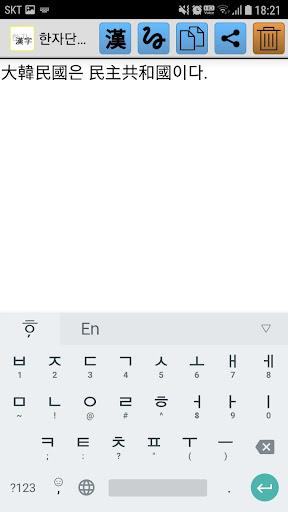
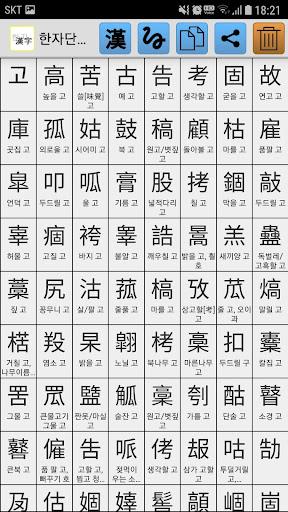
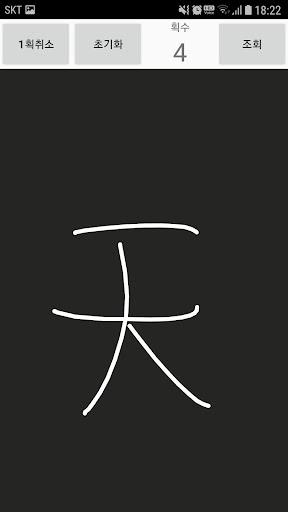
Meet the H한자변환 app – your ultimate tool for effortless Hangul typing and Kanji input. This powerful application supports an extensive collection of 27,484 Kanji characters based on Unicode 3.0, giving you unmatched flexibility. Need special symbols? Simply type alphabetic characters to insert them instantly. With the built-in copy function, you can seamlessly transfer your text to messages or emails. While this app doesn’t include word translation, pairing it with our complementary Hanja word converter enhances its capabilities. Just type your sentence, select Hanja characters from the suggestions, and save your work. Plus, handwriting support lets you draw Chinese characters directly!
Key Features of 한자변환(漢字變換):
⭐️ Hangul-to-Kanji Conversion: Type in Hangul and instantly receive matching Kanji suggestions for each character.
⭐️ Massive Kanji Database: Access 27,484 Kanji characters compliant with Unicode 3.0 for comprehensive writing needs.
⭐️ Special Symbol Input: Effortlessly insert symbols like ㄲㄲ ㄷ ㄷ ㄷ ㄸ ㅃ ㅃ ㅊ ㅊ ㅌ using simple keystrokes.
⭐️ Easy Copy-Paste: Copy your typed sentences with one tap and paste them into emails, chats, or other apps seamlessly.
⭐️ Companion App Compatibility: Enhance functionality by installing our dedicated Hanja word converter for expanded translation features.
⭐️ Handwriting Recognition: Draw Chinese characters freehand for intuitive and flexible input.
Final Thoughts:
Whether you’re composing messages or drafting documents, this app’s robust Kanji support and symbol input make multilingual communication smoother than ever. The copy-paste feature ensures quick sharing across platforms, while integration with Hanja converters extends its utility. Handwriting input adds a personal touch, making it ideal for diverse writing styles. Elevate your language experience – download today and enjoy effortless typing in Hangul, Kanji, and beyond!